
Your staff
Employees
The Employees app is the record of everyone who works for you: their job, department, pay, contract, leave and documents. It opens on its Dashboard. Its menu also holds Employees, Org chart, Payroll, Recruitment, Appraisals, Payroll payment and User accounts, and Attendance when your company has it.
An employee is not the same thing as a user. An employee is a person you pay. A user is a login. Most employees have both, but a cleaner you pay in cash may have no login at all, and that is fine.
Everybody you add under Staff & Roles is put in Employees for you, so attendance, payroll and leave find them without anybody typing them twice. A teacher added in School or a driver added in Track is an employee here too. The owner is not on the payroll unless you add them.
The dashboard
Employees → Dashboard answers "how are my people today?" on one page.
- Figures: headcount and its change this month, who is in today out of who is expected, who is late and by how much on average, who is on leave, who joined and who left, and turnover over twelve months.
- Coming up in the next 60 days: contracts and probation ending, documents expiring, and birthdays and work anniversaries. Each line opens the person.
- Away this week: one row per person, Monday to Saturday, coloured by kind of leave.
- People by department, New staff from the last six weeks with how complete each profile is, and the month's Payroll.
- Attendance this month: the share of days on time, overtime waiting for approval, and who is late most often. Without Attendance this card offers Ask for Attendance.
The staff list
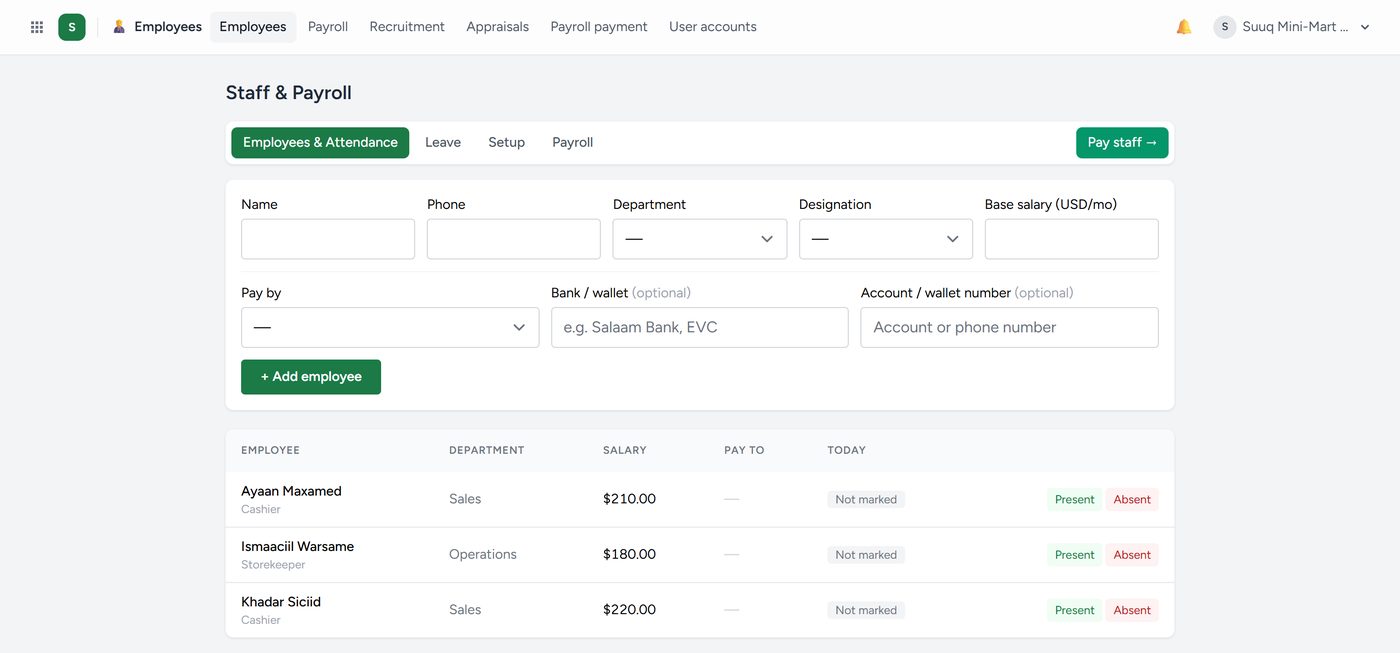
Employees → Employees is the screen headed Staff & Payroll. Its buttons do the jobs you do most: + Add employee, Record leave, Run payroll and Pay staff.
The cards across the top count Employees, Present today, Absent today, Not marked and On leave today. Click a card and the list shows exactly those people. With Attendance the cards say In today and Not in yet, read from the machines.
Search by name, phone, staff number or email, and filter by department or by who is working here or has left. Click a row to open the person's panel, then Full profile →.
To add an employee:
- Click + Add employee.
- Fill in the person (name, phone, email, address), the job (department, job title, staff number, start date) and the pay (salary, paid by bank, mobile money or cash, and the account).
- Click Add employee.
Only the name is required. When your company runs Kenyan payroll, the form also asks for the KRA PIN, NSSF number and SHIF number. The new person's file then opens, ready for a contract. Somebody with no contract on file is flagged, and payroll warns you.
Setup, on the same screen, holds your departments and job titles with how many people hold each; one nobody holds can be removed. Here you also set Annual leave days for the company (21 until you change it). Only owners and managers can open this screen.