
The day-to-day: taking money
The till (Point of Sale)
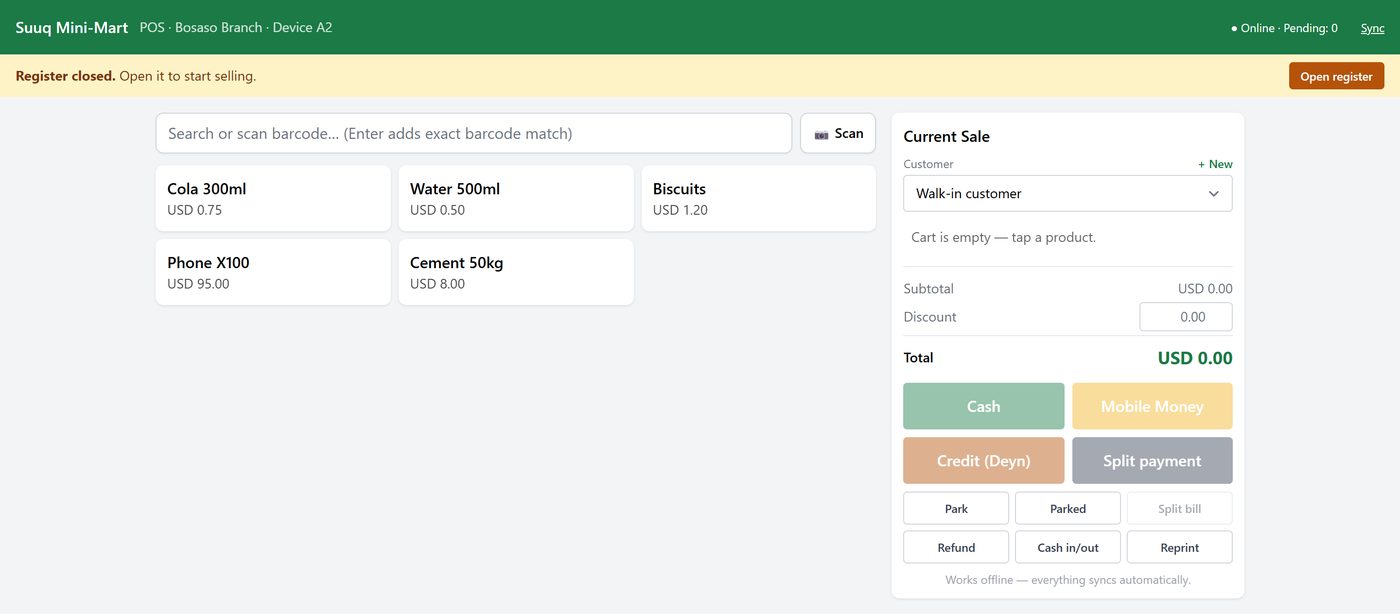
This is the screen a cashier lives in. It is built to be fast, to work with a touchscreen or a keyboard, and to keep going when the internet does not.
Opening the register
At the start of a shift the till shows Register closed in a yellow bar. You cannot sell until it is open.
- Click Open register.
- Enter how much cash is in the drawer right now — the float.
- Confirm.
That opening figure matters at the end of the day: Kaydro compares what should be in the drawer against what you actually count, and shows the difference.
Making a sale
- Add the products. Either tap a product tile, or type into the search box. If you have a barcode scanner, just scan — the item drops straight into the sale. Pressing Enter after typing a full barcode does the same thing.
- Check the cart on the right. Change a quantity or remove a line there.
- Choose the customer, if it matters. Leave it as Walk-in customer for somebody paying cash and leaving. Choose a real customer if they are buying on credit, or if you want the sale on their history. + New adds a customer without leaving the till.
- Apply a discount if you are allowed to, in the Discount box.
- Take the money. Pick the button that matches how they paid — the table below says which is which.
- The receipt prints. The sale is complete, the stock has come down, and the money is on the books.
| Button | Use it when |
|---|---|
| Cash | They handed over notes |
| Mobile Money | Sahal, EVC Plus, eDahab, Premier Wallet |
| Credit (Deyn) | They are taking the goods and paying later |
| Split payment | Part cash, part mobile money, part credit |
Credit (Deyn) needs a real customer. You cannot sell on credit to a walk-in, because there would be nobody to chase. Kaydro will ask you to pick or add the customer first.
The other buttons, and when you need them
- Park — a customer is not ready, or has gone to fetch more money. Park the sale, serve the next person, and bring it back from Parked.
- Split bill — one table, several people paying separately. Split the lines between them.
- Refund — the customer is bringing something back. Find the original sale, choose the lines being returned, and Kaydro puts the stock back and the money out.
- Cash in/out — money moving into or out of the drawer that is not a sale: paying a delivery driver, taking a float to the bank. Always record it here, or the drawer will not balance.
- Reprint — the customer wants the receipt again.
Closing the register
At the end of the shift, close the register. Count the drawer, enter the figure, and Kaydro shows what it expected and the difference. That difference is the number a manager should be looking at, every day.
Working with no internet
If the connection drops, the top of the till changes from Online to Offline and shows a count of sales waiting to be sent. Keep selling. Receipts still print, stock still comes down, credit still records.
When the connection returns, the pending count drains to zero on its own. If you want to push it immediately, click Sync.
Do not close the browser while sales are still pending. They are stored safely on the device, but the simplest habit is to leave the till open until the pending count reaches zero.