
The people you deal with
Kaydro Book — money owed, both ways
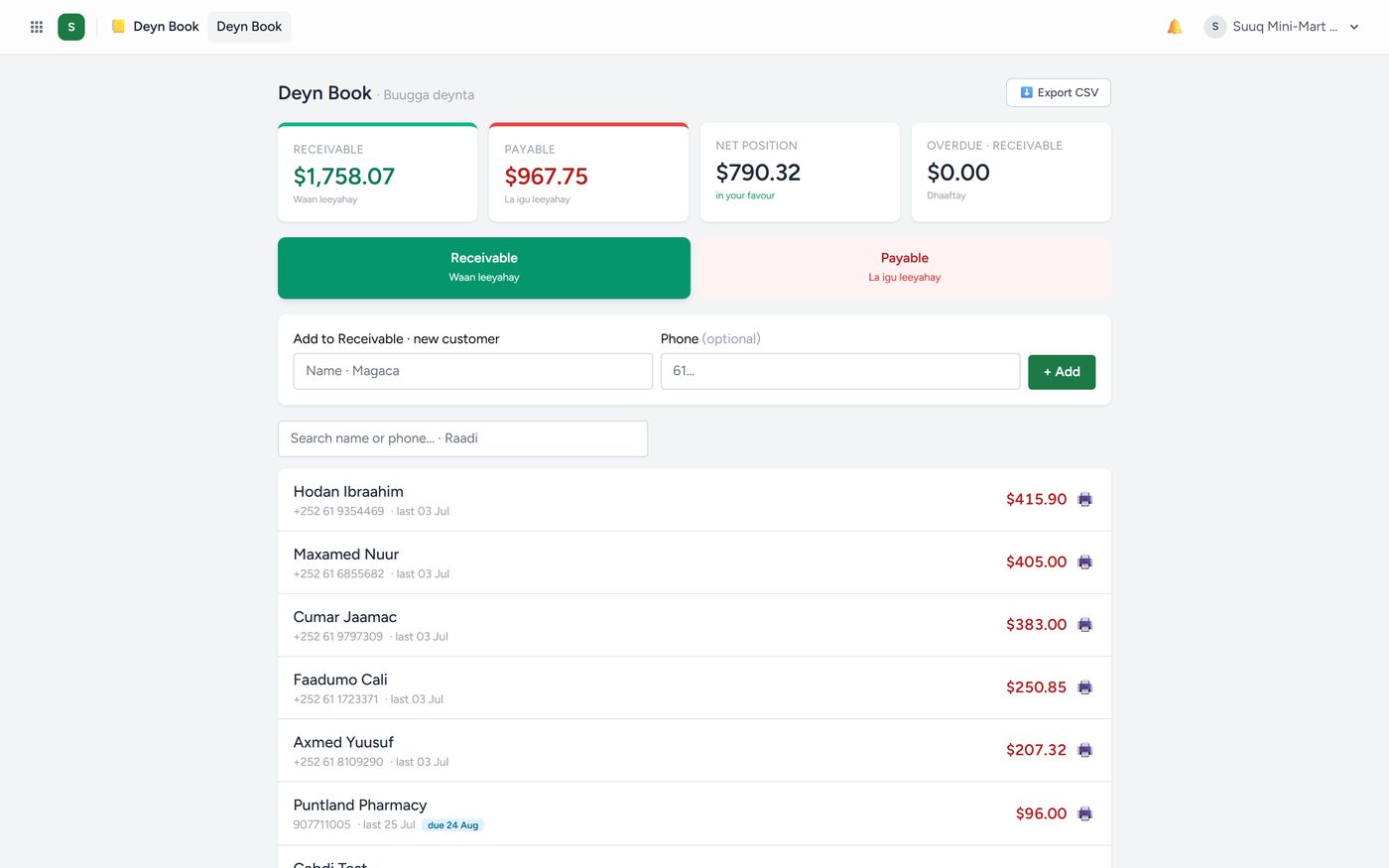
Credit is how business is actually done, and a notebook behind the counter is how it is usually recorded. Kaydro Book replaces the notebook. Inside a full Kaydro company the same app is called the Deyn Book; everything below applies to both.
A shop that keeps only the Deyn Book opens on its own home: + New deyn, then what customers owe you, what you owe suppliers, who is late and what was collected this month. Each figure opens the people behind it. Needs attention lists whose promise falls today and who is late, and Late, biggest first opens each person.
In the book, the four boxes across the top work the same way:
| Box | Meaning |
|---|---|
| Customers owe you (waan leeyahay) | Money customers owe you |
| You owe suppliers (la igu leeyahay) | Money you owe suppliers |
| Late | Past the date they promised, and how many people |
| Collected this month | What came in this month; it opens who paid. Below it, the net of both books |
Customers and Suppliers switch the book; Late only shows just the late ones. On a phone each person is a row with the line that says where they stand ("Promised 2 Nov · 16 days late", "Due Friday", "Paid today"); on a computer it is a list you can sort.
The book speaks English, Somali and Swahili: the shop's language is set in Settings, and each person can choose their own. Money is in the currency the shop chose at sign-up.
Writing a deyn
Press + New deyn. Choose the customer, or + A new customer and type the name and phone. Type the amount, what they took, and the day they promise to pay. Save deyn. If the customer has a credit limit and this deyn takes them over it, the panel says so before you save.
A payment
Press Payment (or Paid on a customer). All or Half fills the amount; choose cash or the wallet it came into, add the M-Pesa code if you like, and Save payment. The balance updates, and the payment is on the books as real money received.
A customer's record
Press a person to open their record: what they owe and where they stand, their credit limit (Set a limit), how many days they usually pay in, how old the oldest unpaid deyn is, and the history of every deyn and payment.
At the top: + Deyn, Paid, WhatsApp and SMS (a polite reminder already written with the amount and the date; nothing is sent until you press send), and the statement:
- Share statement makes the statement a PDF and, on a phone, opens the share menu: choose WhatsApp and the client, and the PDF goes in the chat. On a computer it downloads the PDF and opens WhatsApp with the message to that client, ready for the file to be attached.
- Download PDF keeps the file, to send any other way.
- Print opens the statement to print.
Your plan
A new Deyn Book has 14 days of everything. After that it goes on free for 16 customers: you can still record payments from everyone, and read and download the whole book; a new customer or a new deyn past the 16 asks for Deyn Pro. Deyn Pro is KES 300 a month (USD 3 in Somalia), or a year for the price of ten months: as many customers as you have, reminders sent for you, a daily summary, staff and your logo.
Your plan (from the home's tile or Subscribe on the book) shows where you stand and lets you pay: an M-Pesa prompt comes to your phone, or pay by card, or by EVC, Zaad or a bank and send the code to Kaydro on WhatsApp.
On a phone, a customer's page has two big buttons at the bottom: You gave (a new deyn) and You got (a payment). It also shows the totals given and got, a note about them, and the history by day with the balance after each entry.
Invoices and quotes
Invoices (from the home, or + Invoice on a customer) is for a sale written properly: the customer, what they bought (quantity, price, discount), the due date and a note. Save invoice puts it on the customer's balance at once. On the invoice, Share sends the PDF on WhatsApp, Copy link gives the customer a link to open it, Email sends it, and Record a payment takes what they paid. + New quote writes a price before the work; when the customer says yes, Turn into an invoice. Items and prices you type are remembered for next time. On Kaydro Book Pro, Send the same invoice every month repeats it (rent, fees, a contract).
Money: cash book, expenses and reports
Money (on the phone's bottom menu, or the bar at the top) shows what is in the drawer and each wallet. + Money in records counter sales; − Money out records an expense (rent, transport, tea) from the drawer or a wallet. The Cash book lists every movement by day; Expenses adds them up by category; Activity shows everything lately; and Reports gives day by day, customers, suppliers, the cash book and expenses for any period, each with Download (Excel).
Quick entry
Above the book, type or say one line: "Abdi paid 300", "Abdi took 500 rice" (in Somali "Abdi bixiyay 300", "Abdi qaatay 500 bariis"; in Swahili "Abdi amelipa 300", "Abdi amechukua 500"). Press Read (or 🎤 to say it). A card shows who it found, the amount and the balance before and after; Yes, save it writes it. Nothing is saved before you say yes.
View a statement before you send it
On a customer, View statement shows the statement exactly as they will get it. Choose the period above it: Everything, This month, Last month, Last 3 months, This year, or two dates and Show these dates. What they owed before the period shows as Brought forward. When it looks right, Share on WhatsApp, Download PDF or Print: each sends the period you chose.
Payments from your M-Pesa or bank statement
Match a statement (on the book, or Customers in full Kaydro): choose the account the money came into and upload the statement (Excel, CSV or PDF). Each payment is matched to a customer by the phone it came from or their name; check the list, choose the customer on any line in red, untick what is not theirs, and Save the ticked payments. Their balances go down at once. A payment already in the book is never taken twice. On Kaydro Book, this is part of Pro.
Finding and sorting
In + New deyn, Payment and an invoice, type a name or a phone number in the customer (or supplier) box and pick from the short list. Above the list of customers or suppliers, Sort by Biggest owed, Latest, Oldest or A–Z, and Dates shows only who has an entry between two dates.
Small things that help
What a customer owes shows red and bold, on their record, in the list, and the moment you pick them in Payment. A customer who paid more than they owed shows Paid ahead in green. 📞 Call rings them. When you write a deyn, add a Photo of the bill: it stays with the line, private to your shop. From the home, Your helpers gives each person at the counter their own login, and Logo & shop name puts your logo on statements and invoices.
Getting paid
On Deyn Pro (and the trial) the book reminds customers for you: every morning, by SMS in their language with their statement link, on the day they promised, on the collection date you set for them (Next week, Next month, or a date), and once a week while they are late. Untick Remind them for me on someone you would rather call yourself. On the collection day you also get a notice: "Abdi owes you KES 900: today is the day to collect."
Remind on a customer offers WhatsApp, an SMS from your phone, Send an SMS for me, Copy the message or email; each reminder shows in their history. Remind all late on the book sends one to everyone late at once. Every evening at 8 an SMS tells you what came in today, the new deyn, what customers owe and who is late.
Your plan → Getting paid has the switches, the reminder SMS used this month (100 are included), and Connect M-Pesa: with your Paybill or Till connected, payments to it are written in the book by themselves.
Every customer also has their statement link, on their record: Copy link, Open, or New link (the old one stops opening). The reminder carries it: the customer opens it on their phone with no login and sees what they owe, their statement, how to pay (your M-Pesa Paybill or Till, and your phone) and the PDF, in your shop's name. They see only their own account. Reminders in sets the language of their reminders and page: English, Somali or Swahili.
Set a promise date when a customer says when they will pay. Kaydro then shows you who has broken their promise, which is a far more useful list than who owes the most.